Verified on Ubuntu 26.04 LTS • GTK4 & Wayland

Putting the sharpest edge on your
Razer gaming hardware on Linux.

Native GTK4 remap studios, 16-effect Chroma RGB lighting engine, mouse DPI & polling tuning, dynamic Naga Trinity side-plate detection, and semi-transparent in-game HUDs. Powered by input-remapper and OpenRazer.

$ sudo apt install ./strop_1.2.1_all.deb
Ubuntu 26.04 LTS GNOME on Wayland Python 3.14 & GTK4 GPL-3.0 License
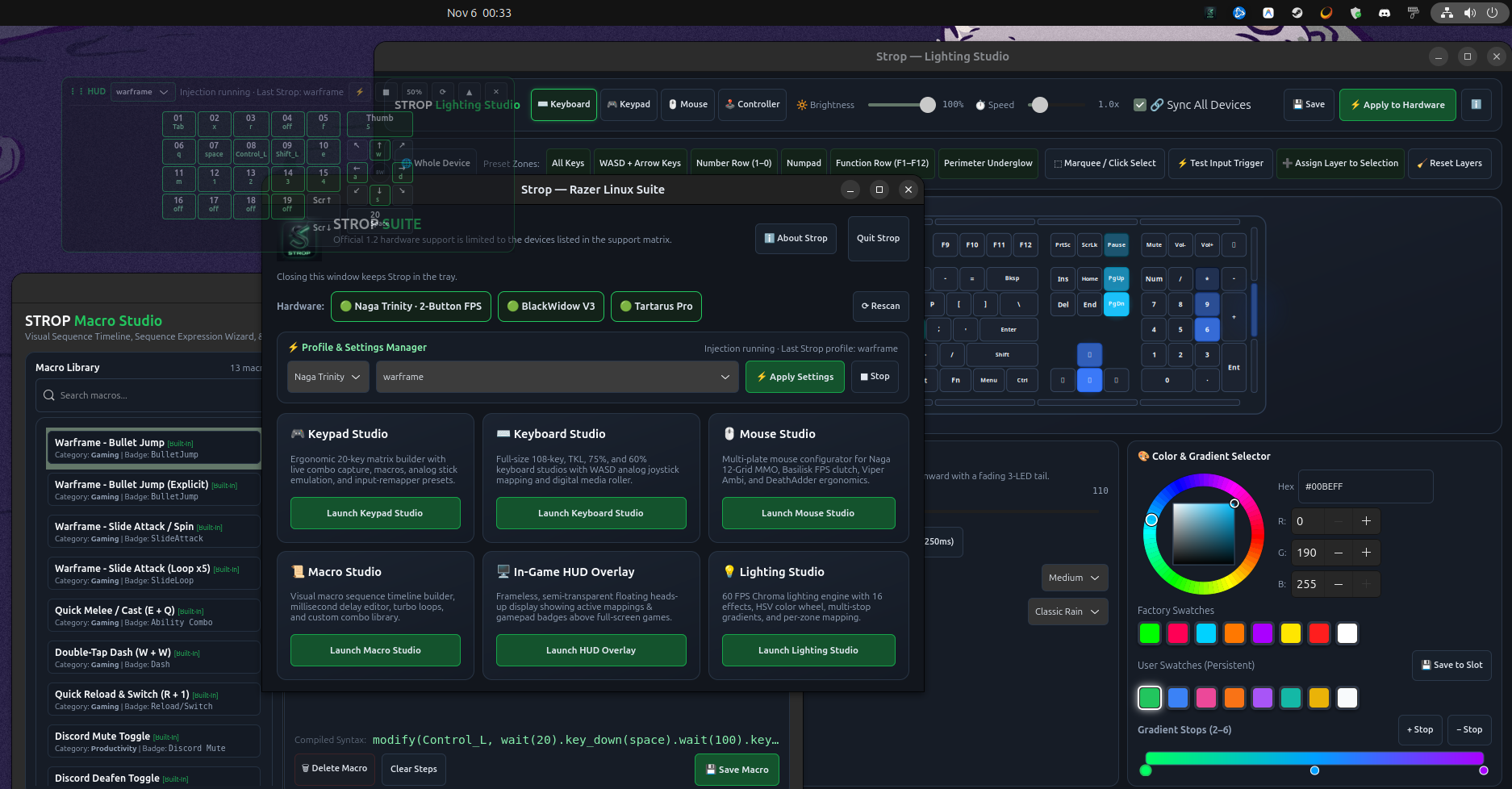
Strop Razer Linux Suite multi-window interface showing the central Hub, Lighting Studio with HSV color picker, Keypad Studio matrix, Macro Studio timeline, and In-Game HUD overlay

The complete Strop Suite running natively on Ubuntu 26.04: Central Hub, Chroma Lighting Studio, Macro Studio timeline, and in-game HUD overlay.

Built for Performance & Precision

Each peripheral category gets a dedicated, native GTK4 studio crafted for rapid game tuning and zero background bloat.

Strop Hub Central Core

Orchestrates device discovery, USB permissions, and input-remapper daemon states with 5-second health checks and instant profile switching.

  • One-click hardware rescan & diagnostics
  • Real-time injection state indicators
  • System tray / StatusNotifier integration

Chroma Lighting Studio 16 RGB Effects

Full 60 FPS interactive Chroma RGB preview canvas powered by OpenRazer. Customize color stops, custom gradients, and reactive input triggers.

  • HSV color wheel with persistent swatches
  • Wave, Breathing, Spectrum, Rain, Ripple
  • Single-device or unified multi-device sync

Mouse Studio Dynamic Plates

Engineered for multi-plate mice like the Razer Naga Trinity. Automatically detects attached 2-button FPS, 7-button Hex, or 12-button MMO side plates.

  • Automatic side plate detection on rescan
  • DPI stage calibration (100 to 16,000+ DPI)
  • 125Hz, 500Hz, and 1000Hz polling rate controls

Keypad & Keyboard Studio Ergonomic Matrix

Visual 20-key matrix configurator for Tartarus Pro, Tartarus V2, and fullsize keyboards like the BlackWidow V3 with digital media rollers.

  • 8-way thumb D-pad & analog stick emulation
  • Gamepad button mapping (South, East, Bumpers)
  • Live input capture and key swap mechanics

Macro Studio Sequence Timeline

Visual macro sequence timeline builder with live recording, millisecond delays, turbo repeat loops, and input-remapper parser syntax validation.

  • Built-in gaming templates (Slide Attack, Dash)
  • Modifiers: wait(), key_down(), loop(xN)
  • Saved under ~/.config/strop/macros.json

In-Game HUD Overlay Live Binds

Frameless, semi-transparent floating heads-up display overlay showing active key mappings and gamepad badges directly over full-screen games.

  • Remembers position, opacity, & collapsed state
  • Color-coded badges for custom vs default binds
  • Standalone launcher via strop_hud.py

Hardware Compatibility Matrix

Search and filter verified Razer devices tested on Ubuntu 26.04 with input-remapper and OpenRazer.

Razer hardware device support matrix and capabilities in Strop
Device Name Category USB ID Status Supported Features Drivers
Razer Tartarus Pro 20-Key Analog Optical Keypad Keypad 1532:0244 Verified
20-Key Matrix 8-Way D-Pad Chroma RGB HUD Overlay
input-remapper + OpenRazer
Razer Naga Trinity Modular 2/7/12-Button Swappable Plates Mouse 1532:0067 Verified
Dynamic Plate Detection DPI Stages 1000Hz Polling Chroma RGB
input-remapper + OpenRazer
Razer BlackWidow V3 Fullsize 108-Key Mechanical Keyboard Keyboard 1532:024e Verified
Full Keyboard Remap Digital Media Roller Chroma RGB
input-remapper + OpenRazer
Razer Tartarus V2 Mecha-Membrane Gaming Keypad Keypad 1532:022b Supported
20-Key Matrix Scroll Wheel Chroma RGB
input-remapper + OpenRazer
Razer Orbweaver Chroma Mechanical Ergonomic Keypad Keypad 1532:0113 Catalog Layout
20-Key Matrix Thumb Module RGB Sync
input-remapper + OpenRazer
Razer Basilisk V2 / V3 Ergonomic FPS Gaming Mouse Mouse 1532:0085 Supported
Hypershift Paddle Tilt Wheel DPI Stages Chroma RGB
input-remapper + OpenRazer
Razer DeathAdder Series V2, V3, and Elite Ergonomic Mice Mouse 1532:007b Supported
Side Buttons DPI Tuning Chroma RGB
input-remapper + OpenRazer
Razer Viper Series Ambidextrous Ultralight Gaming Mice Mouse 1532:0078 Supported
Dual Side Buttons DPI Tuning Chroma RGB
input-remapper + OpenRazer
Razer Huntsman Series Elite, V2, Mini, and Tournament Edition Keyboard 1532:0226 Supported
Opto-Mechanical Matrix Media Controls Chroma RGB
input-remapper + OpenRazer
Razer Ornata Series Mecha-Membrane Hybrid Keyboards Keyboard 1532:021e Supported
Standard Matrix Chroma RGB
input-remapper + OpenRazer

Quickstart & Documentation

Everything you need to configure your Razer gaming hardware on Linux in under five minutes.

1

Install the Debian Package

Download the latest release and install it via APT. System dependencies (Python 3.14, GTK4, PyGObject, python-evdev) will be resolved automatically.

# Download and install the latest verified Debian package
sudo apt update
sudo apt install ./strop_1.2.1_all.deb
2

Verify Backend Services

Ensure the input-remapper service is active and communicating with its D-Bus daemon:

# Verify input-remapper daemon status
systemctl status input-remapper
input-remapper-control --command hello

# Optional: Verify OpenRazer daemon if using Chroma lighting
openrazer-daemon -v
3

Launch Strop as Desktop User

Important: Launch Strop as your logged-in desktop user. Never launch the GUI with sudo, as remapping profiles are stored under your personal ~/.config/strop/ directory.

# Launch Strop directly or from your desktop application launcher
strop